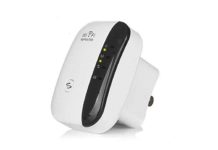
An eero booster is an eero extender that adds another point to an existing eero mesh Wi-Fi network, helping carry your connection into rooms where the signal is weak. The eero 6 Extender is designed to add up to 1,500 square feet of Wi-Fi 6 coverage when used with an existing compatible eero network, so it is a practical choice when one room, floor, or corner of the home needs better coverage.
eero 6 Extender: Quick Buyer Card
| Designed for | Expanding an existing eero Wi-Fi 6 mesh network |
| Coverage claim | Up to 1,500 sq. ft. |
| Wireless standard | Wi-Fi 6, dual-band concurrent 2:2 |
| Setup needs | eero router, eero account, supported iOS or Android device, and internet service |
| Product Page | eero 6 Extender product page |
How does an eero extender work?
Rather than creating a separate Wi-Fi network for the far end of the house, an eero extender joins your existing eero mesh. Your eero network then has another nearby point through which compatible devices can connect. Ring says you can add extenders as needed to maximize coverage throughout the home.
The eero 6 Extender requires an existing eero network. It is backward compatible with earlier Wi-Fi generations, while Wi-Fi 6 performance requires an eero Wi-Fi 6 router. That distinction matters if you are replacing an older router: the extender expands the eero system; it is not a replacement for the main router.
Is an eero booster better than a regular Wi-Fi extender?
For a home that already uses eero, the mesh approach is the simpler fit because the new unit is made to join the same eero network and is set up in the eero app. A traditional extender can be useful for other router brands, but it is a different setup path.
If you are comparing several plug-in solutions before building out a network, our wifi ultraboost review and megaboost wifi healer review explain what to compare in a signal-booster purchase.
Do you just plug in an eero extender and it works?
You plug it in, but it still needs to be added through the eero app. Ring lists these setup requirements: an eero router, a supported iOS or Android device, internet service, and a cable or DSL modem if your service needs one. You also create an eero account.
Start with the extender in the same general area as the existing network, complete the in-app setup, and then place it where it can still receive a solid connection from the rest of the mesh. This gives you a clear point to test before you settle on its final room.
Where should an eero extender go?
Put the extender between your main eero and the place where Wi-Fi starts to drop. It needs a useful connection back to the mesh in order to pass that connection farther along. A central outlet on the path to the problem area is usually more useful than an outlet at the very edge of coverage.
Avoid placing it behind large obstructions or in a spot with heavy interference. eero notes that real-world coverage can change with building materials, obstructions, connected devices, device use, and interference. You can move the extender to another room after setup; test the connection in the room you care about before deciding that location is the keeper.
Can it reach another building 100 feet away?
A detached building 100 feet away needs a placement plan, not just an extra outlet. Begin by checking whether the existing eero signal reaches a point facing that building, then place the extender where it can connect back to the mesh while remaining as close as practical to the destination. Walls, exterior materials, trees, and other obstacles can change the result, so test the location with the devices you expect to use there.
If the building needs a dependable connection for work, cameras, or smart-home gear, confirm its signal at the intended location before relying on it. Ring states that coverage estimates are based on normal conditions and that actual range varies with the environment.
Will an eero extender raise your internet bill?
An extender expands your in-home Wi-Fi coverage; it does not change the internet-service plan itself. Your recurring cost stays tied to the plan you choose from your internet provider. The equipment uses household electricity, so its running cost depends on your local electric rate and how long it remains powered.
eero 6 Extender specifications
| Specification | eero 6 Extender |
|---|---|
| Wi-Fi | Wi-Fi 6 dual-band concurrent 2:2 (802.11ax), compatible with older Wi-Fi standards |
| Processor | Quad-core 1.2 GHz |
| Memory and storage | 512 MB RAM; 4 GB flash storage |
| Dimensions | 3.9 × 3.8 × 2.4 inches |
| Power input | 100–240V AC, 50–60 Hz |
| Operating conditions | 0°C–40°C; 0%–90% non-condensing humidity |
| Security and network features | WPA3, WPA2, profiles, IPv6, NAT, VPN passthrough, UPnP, port forwarding, and static IP |
| Warranty | One-year limited warranty |
The eero 6 Extender is the model detailed on the current Ring product page. If you are specifically shopping for eero 6+, check the exact router or extender listing at checkout so the model and its included hardware match what you intend to add.
What does an eero booster cost?
Prices shown as of October 20, 2026: Ring lists the white eero 6 Extender at $79.99. The same listing says it ships in the United States only. Check the cart for today’s price, delivery estimate, taxes, and any available bundle before you complete the order.
| Item | Listed price | What it is for |
|---|---|---|
| eero 6 Extender | $79.99 | Adds coverage to an existing eero network |
| eero 6 Router | $89.99 | Main eero router listed alongside the extender |
| eero 6 Starter Kit | $199.99 | Starter system listed alongside the extender |
Could an Echo Dot extend your eero network?
eero says an Echo Dot (5th Gen) can act as a Wi-Fi extender when paired with a compatible eero router, with coverage of up to 1,000 square feet. That option may suit a room that already needs an Echo Dot, while the eero 6 Extender is purpose-built for adding another Wi-Fi 6 mesh point.
Before you order
- Confirm that you already have a compatible eero network; the eero 6 Extender requires one.
- Measure the route from your main eero to the room, garage, or outbuilding that needs coverage.
- Choose an outlet that sits between the existing signal and the dead zone, not beyond the signal’s useful edge.
- Check the product cart for the current price, shipping destination, delivery date, and return terms.
- Have your phone ready for the eero app setup.
By InfinitePowerSolutions.com Technology Desk