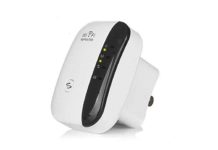
NetBoost WiFi Repeater can help extend your existing WiFi into one weak room, patio, garage, or similar dead spot when it receives a usable signal from your router. It works by receiving that signal and rebroadcasting it farther into your space, so the realistic result is better coverage—not a new, faster internet plan.
Affiliate disclosure: Some links on this page are affiliate links. If you buy through them, this site may earn a commission.
This is desk research based on the maker’s product and policy pages plus WiFi-industry guidance. NetBoost is marketed as a plug-in, 2.4GHz WiFi repeater with WPS setup, universal router compatibility, a LAN/Ethernet connection, and speeds of up to 300Mbps.
Does NetBoost WiFi Repeater work for a dead zone?
For one area that has weak WiFi but is not completely out of reach of your router, a repeater is the kind of device built to help. The maker says NetBoost bridges the signal from your router to rooms and outdoor areas that need more coverage, and lists up to 300Mbps, WPS pairing, 2.4GHz support, and multiple-device connections.
The important part is placement. Consumer Reports’ extender testing describes extenders as a spot fix: plug one in about halfway between the router and the weak area so it can receive a solid signal before it sends that signal onward. If your phone already loses connection at the outlet, that outlet is too far away for a repeater to do much with.
| What NetBoost is offered to do | What that means for you |
|---|---|
| Extend 2.4GHz WiFi | Useful for reaching a single weak area when the router signal remains usable at the repeater. |
| Up to 300Mbps | This is the maker’s stated maximum; your result depends on your incoming internet service, router signal, distance, walls, and connected devices. |
| WPS setup | You can try a button-based connection if your router has WPS. |
| LAN/Ethernet label | Check the device and checkout details if you need a wired connection for a nearby TV, console, or computer. |
What result should you realistically expect?
Expect a coverage extension, not a full replacement for a strong router or a whole-home network. Consumer Reports says the extra wireless hop can cut throughput roughly in half in an ideal example, while walls, appliances, and distance can reduce it further. That can still be enough for browsing, email, smart-home gear, and everyday use in a room that previously had little or no usable signal.
For 4K streaming, low-latency gaming, or several demanding devices across a large multi-floor home, a mesh system or wired access point is the better category to compare. NETGEAR’s extender guide likewise explains that retransmitting can add delay and reduce performance, while mesh systems are designed for broader coverage and smoother movement between rooms.
If the issue is one back bedroom, garage, or patio edge, NetBoost fits the simpler and lower-effort approach. For a home with several dead zones, start by mapping where the signal drops before deciding whether one repeater is enough.
WiFi repeater, extender, or booster: what is the difference?
In everyday shopping, “booster,” “extender,” and “repeater” are often used for devices that rebroadcast WiFi. ScreenBeam’s terminology guide describes a wireless repeater as a device that rebroadcasts the WiFi signal it receives, while a range extender sits between the router and the area needing coverage. For your decision, the practical question is whether the device has a strong enough source signal and whether one weak area is all you need to cover.
For another building about 100 feet away, an indoor plug-in repeater is not the simple answer to assume will work. Exterior walls and the distance change the job. Compare an outdoor coverage solution, a mesh node placed where it can receive a strong signal, or a wired connection to an access point in the other building.
How do you connect NetBoost?
The maker says NetBoost uses WPS for quick setup. Start with the repeater near your router, plug it into power, and use the WPS button according to the device instructions and your router’s WPS process. Once paired, move it to an outlet about halfway to the room where you need coverage.
- Check that your router has a WPS option and that NetBoost can connect before moving it.
- Choose an outlet where your phone still has a dependable router signal.
- Move the repeater a little at a time toward the dead zone and test your connection there.
- Connect a device and check whether it stays connected in the room that prompted the purchase.
Do not place it inside the dead zone, behind large appliances, or where thick walls and floors already block the router signal. A repeater cannot create a strong connection from a weak one.
What are the downsides of using a WiFi extender?
The trade-off for easier coverage is that the repeater has to receive and send the same connection onward. That can mean slower throughput and more delay than you get near the router. ScreenBeam notes that repeaters can increase latency, and Consumer Reports explains why the added step can reduce speed.
NetBoost is listed as a 2.4GHz device, so check your router setup and the devices you want to connect. The maker’s stated 300Mbps figure is a maximum, not a promise that every room, plan, or home layout will reach that speed. If you need stronger performance across several rooms, compare it with a mesh setup; for a single trouble spot, the smaller repeater approach may be enough.
For another look at a signal-booster category product, see this site’s WiFi UltraBoost guide. If your concern is keeping security devices useful during an outage rather than extending signal range, the camera backup power guide explains that separate planning problem.
What does NetBoost cost, and what are the shipping and refund terms?
The NetBoost sales page promotes a discount of up to 70%, but it does not state a fixed product price in the information here. Prices and bundles can change, so check today’s price directly with the company at checkout. The maker says it offers a 30-day money-back guarantee and asks buyers to follow its return and refund policy.
| Checkout item | What the seller states |
|---|---|
| Product price | A discount of up to 70% is promoted; confirm the current item and bundle price at checkout. |
| Shipping charge | Calculated at purchase based on location and other factors. |
| Delivery estimate | Usually 5 to 14 working days; the terms say some deliveries may take up to 30 days. |
| Refund window | The NetBoost sales page says 30 days; check the return-policy steps and any conditions before paying. |
| Address limits | The seller says it cannot deliver to PO boxes or packing stations. |
The seller lists support through Spark-Tek’s Help Center, email, and telephone contact details, and lists a mailing address on its contact page. Its terms say product prices exclude shipping and associated costs, while the checkout calculates the shipping cost.
How can you tell whether the ad and checkout are legitimate?
A legitimate-looking ad is not a reason to skip the basic checks. Read the product description closely, compare the price and shipping total before payment, and make sure the checkout identifies the item, quantity, and return route you expect. The seller’s privacy policy says payment information is encrypted with SSL and stored with AES-256 encryption, while also noting that internet transmission is never completely secure.
Three useful trust checks are simple: make sure the site gives a reachable support method, read the shipping and refund terms before paying, and save your confirmation, order number, and screenshots of the offer you accepted. If you accidentally open an unsecure-looking page, do not enter payment details; close it and navigate directly to the company’s stated site yourself.
Before you order NetBoost
- Confirm your router supports the setup method you plan to use, including WPS if that is how you want to pair it.
- Identify an outlet halfway between your router and the weak area.
- Check the final item price, bundle quantity, shipping charge, and estimated delivery date at checkout.
- Read the seller’s return instructions before paying, including how to start a return.
- Choose a mesh or wired solution instead if you need high performance across multiple rooms or a separate building.
By InfinitePowerSolutions.com Technology Desk