
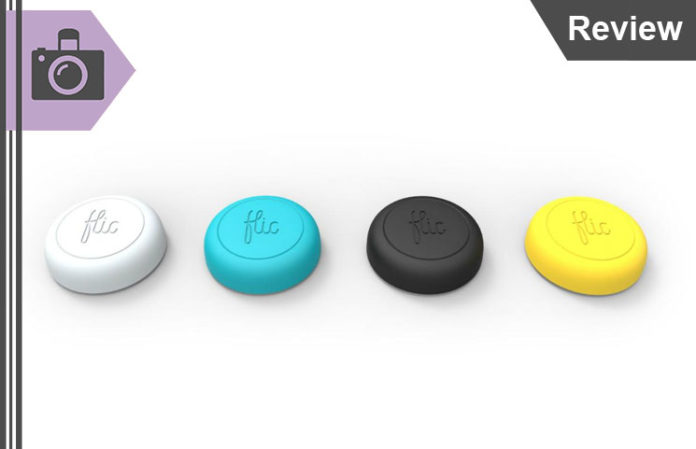
Yes, Flic Button is a Bluetooth smart button that can give you a physical push, double-push, or hold control for phone, computer, and smart-home actions. It is a strong fit when you want a simple control for a routine, light, music, or shortcut without opening an app; the important choice is whether your phone is enough or you want a Flic Hub to keep the setup available when your phone is away.
| Disclosure | This page links to Flic’s product page for reference. |
| Product | Flic Button, a Bluetooth Low Energy smart button |
| Product Page | Flic Button product page |
| Button actions | Push, double push, and hold |
| Direct connection | Flic App on iOS or Android |
| Hub option | Flic Hub, Hub Mini, or Hub LR |
| Battery | Replaceable CR2032; up to 36 months |
| Published range | Up to 50 m indoors |
| Current store status | The single-button page displays “out of stock” |
Flic Button is a small, tactile controller. The maker says it connects through Bluetooth to a phone, hub, or computer and lets you assign a different action to each of its three press types: push, double push, and hold. That can be a light control, a music command, an alarm snooze, or a routine trigger.
The button measures 8.3 mm by 29 mm, has green, yellow, and red LED feedback, and is sold in black or white. Its reusable adhesive is designed for a wall, desk, refrigerator, or another convenient surface. Flic also sells a metal clip, wristband, stickers, and adhesive pads for different placements.
If you are comparing physical controls rather than a full smart-home system, this is the point of Flic: one action can be easy for everyone in the room to recognize and use. For a related look at device-to-phone Bluetooth compatibility, see this bluetooth tracker phone compatibility guide.
Start with the Flic App on your iPhone or Android device. Flic’s setup instructions say to choose “Add Flic to Phone,” then press and hold the button until it connects. Once it appears in the app, choose what a push, double push, and hold should do.
- Install the Flic App on the phone or tablet you plan to use.
- Choose the add-button option in the app.
- Press and hold Flic until the app connects it.
- Assign actions to push, double push, and hold.
- Test each action where you plan to place the button.
A pulsating red LED means the button is new and has not yet connected to a device. Pulsating yellow means it is trying to reconnect to a previously paired device. Green means it is working correctly.
Can Flic pair with iPhone and Android?
Yes. Flic lists iOS and Android compatibility, and says the button can connect directly to a smartphone or to a Flic Hub. The number of buttons that can work at once depends on the phone, tablet, and broader Bluetooth setup. Flic says a typical setup can connect up to 10 buttons, while some Android devices limit Bluetooth devices to seven.
If your phone already has headphones, speakers, a watch, and trackers connected, test your planned button count before committing to a multi-button kit. A flic button review covers the broader product decision alongside this Bluetooth setup guide.
Do you need a Flic Hub?
You do not need a hub to pair Flic Button with a smartphone. A hub makes more sense when you want your automations to remain available whether or not the phone is nearby. Flic says its hub-based setup stays on regardless of the smartphone’s presence.
| Setup | What it fits | What to know |
|---|---|---|
| Phone or tablet | A personal shortcut used near your device | Pairs through the Flic App over Bluetooth |
| Flic Hub Mini | A household setup that should stay active | Flic recommends Hub Mini for households |
| Flic Hub LR | Advanced or business automations | Flic says it is needed for advanced features such as HomeKit support |
The Hub supports up to 63 buttons at the same time, according to Flic. That makes it the more practical route for several rooms, shared controls, or a business deployment.
Flic describes integrations for connected devices and services, while its product page specifically identifies Hub LR for advanced HomeKit support. Before ordering for a Google Home routine, ask Flic support whether your exact Google Home devices and intended action appear in the current integration flow. That quick check is especially useful when the button is meant to control several brands at once.
MatterAlpha’s Flic 2 button review describes a hub-based Matter setup and reports that the Flic Hub LR is not a Thread Border Router. In practical terms, keep the exact smart-home protocol and the hub you plan to use in view rather than assuming every Matter or Thread device will follow the same setup.
Flic says the replaceable CR2032 battery lasts up to 36 months, or up to three years. The button gives a battery warning with one green blink followed by two red blinks. A short red blink can also point to a low battery or a poor battery connection.
To replace it, Flic says to place the button on a flat surface, twist it to the right while applying pressure, remove the battery, insert a fresh CR2032, then refit the cap. Check that the battery touches the pads properly before treating a pairing issue as a Bluetooth problem.
Flic’s reset instructions use the main button and battery hatch: open the hatch, remove and reinsert the battery, then hold the button for 10 seconds. Release it when the LED flickers to indicate a reboot.
Afterward, delete the button from the Flic App and from the device’s Bluetooth settings, reboot the phone or tablet, and pair it again as a new button. This is the manual factory-reset route when a previously paired button has stopped responding.
Flic markets the button for lights, routines, music, blinds, and alarms. It also says the button can be used with its app or internet services such as IFTTT when an action is not available directly in the app. The best first setup is usually one obvious, repeatable job: a single light, a music pause, or a leave-home routine.
For music-focused Bluetooth gear, the outstyle music review may help you compare another type of wireless control decision. If you want a programmable beacon instead of a press-button trigger, see the Nyvida Bluetooth iBeacon review.
Bluetooth range, water resistance, and placement
Flic lists Bluetooth 5 LE Long Range and an indoor range of up to 50 m. Range depends on the location of the phone or hub and what sits between it and the button, so test the intended wall or room before fixing the adhesive permanently.
The product page rates the button IP44 splashproof. Flic says wet hands and light splashing should not affect it, but it does not recommend submersion or prolonged spraying. Put it where it is easy to reach and where a press has a clear purpose; a label or sticker can prevent two buttons from becoming guesswork.
What does Flic cost and what comes in a kit?
Prices shown October 27, 2026. The Flic single-button product page displays an out-of-stock notice and does not show a dollar total in its visible order area. MatterAlpha lists a three-pack at $90, Hub LR at $90, and Hub Mini at $30; treat those figures as a comparison point and confirm the current bundle total in Flic’s checkout.
| Option | Contents stated by Flic | Buying point |
|---|---|---|
| Single Flic Button | One Flic Button | The current product page displays out of stock |
| Three Pack | Three Flic Buttons | Flic advertises a 15% saving |
| Button Starter Kit | Three buttons, Hub Mini, USB-C power cable | Useful when you want an always-on household setup |
| Six Pack | Six Flic Buttons | Flic advertises a 28% saving |
Flic’s product page says US orders ship within three business days, while EU and rest-of-world shipping is estimated for early November. It also states a one-month satisfaction guarantee and a two-year warranty. Save your order confirmation and check the current shipping charge, delivery estimate, and return steps at checkout.
Is Flic a good fit for your setup?
Flic makes the most sense when a visible physical control removes friction: a guest-room light, a music command, a routine by the front door, or a one-touch phone shortcut. Three distinct press actions give one small device more flexibility than a basic on/off switch.
Choose the hub route if the action should work without a nearby phone. Choose a direct phone connection if you want to start with a personal shortcut and keep the cost lower. A Bluetooth tracker serves a different job entirely; this XY3 Find It review explains that kind of phone-connected accessory.
Before you order
- Confirm that your exact phone, hub, and smart-home devices support the action you want.
- Decide whether the button must work when your phone is away; if so, price a hub with the buttons.
- Check stock, shipping cost, delivery estimate, and the current satisfaction-guarantee steps at checkout.
- Plan the button’s location, then test Bluetooth reach before relying on the adhesive.
- Choose a sticker or label for each button when several people will use them.
By InfinitePowerSolutions.com Technology Desk

