
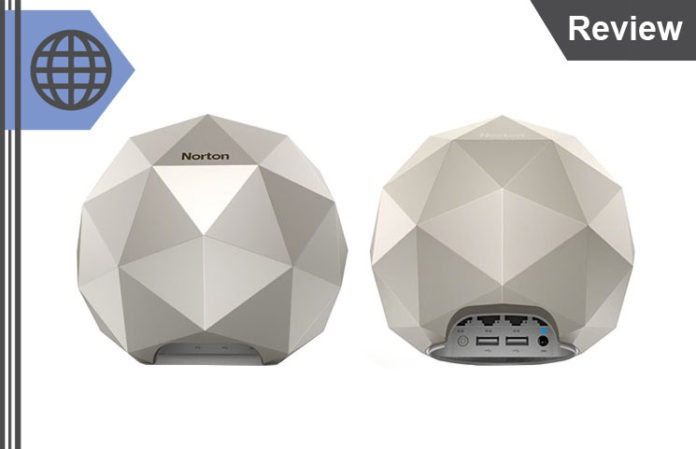
Norton Core protection is the security built into the Norton Core home Wi-Fi router, which inspects the data entering your home network and works alongside Norton software on your PCs and Macs. Norton’s current pages point device-security buyers to its Norton 360 plans instead, so this guide covers both, with the router specs, plan features, reported prices, refund terms, and the steps to log in or turn protection back on.
| What it is | Norton Core home Wi-Fi router with network-level protection, or Norton 360 device-security plans |
| Router hardware | Dual-core 1.7 GHz processor, 1 GB RAM, 4 GB storage, 1 WAN and 3 LAN gigabit ports, 2 USB 3.0 ports (Tom’s Guide) |
| Reported router price | $279.99 in Tom’s Guide’s review; $399 including the first year of Norton Core Security Plus in EFTM’s review |
| Renewal after year one | $10 a month (Tom’s Guide) or $9.90 a month (EFTM) |
| Norton 360 refund window | 14 days for monthly plans; 60 days for annual plans (Norton’s Australia plan page) |
| Setup | Norton Core app for iOS or Android; the setup phone needs mobile data, not just Wi-Fi (Tom’s Guide) |
| Product Page | Norton 360 plans |
Disclosure: This article may contain affiliate links. If you click a link and make a purchase, we may receive a commission at no additional cost to you.
What is Norton Core protection?
Norton Core is a combined router and security appliance. Tom’s Guide router review calls it a combo security appliance and router with a dome-shaped body, and EFTM router review, published in 2018, describes it as a router and home internet solution that the maker calls a “secure” Wi-Fi router.
The name “Core” is also used for LifeLock Core, an identity-monitoring plan. Check which product a page is selling before you pay. Norton’s site says Norton is part of Gen, a global company with a family of trusted brands.
This guide is desk research. The router figures come from the two published reviews, and the plan, price, and refund details come from Norton’s own pages.
How does Norton Core protection work?
Tom’s Guide says Core adds deep packet inspection to your network defenses, which means it examines every bit of data entering the network for signs of an attack. On your computers, Core Security Plus runs traditional scanning and heuristic behavioral analysis, and Tom’s Guide says its browser extensions check sites for reputation before you open them.
EFTM says the router actively monitors and restricts web traffic to known sites, blocks connections between devices that should not be talking to each other, and alerts you in the app. The app keeps a security score and a record of what was blocked and when.
The home controls are a large part of the appeal. EFTM says the parental controls allow individual device control, content filtering levels, daily time limits, and bedtimes. Tom’s Guide says the controls filter content across four age groups and 48 topics, and that you can pause the internet connection at any time. A guest network keeps visitors off your main network.
EFTM’s case for a router like this is the Internet of Things, meaning devices you cannot install antivirus on, such as a smart TV or a connected appliance. If your concern is cameras and doorbells, our Blink home security cameras review covers that side of the decision.
What are the Norton Core router specs and setup needs?
| Item | What Tom’s Guide reported |
|---|---|
| Processor | Dual-core 1.7 GHz |
| Memory and storage | 1 GB RAM and 4 GB flash storage for firmware and settings |
| Wi-Fi | Rated for peak AC2600 throughput, Qualcomm IPQ 8065 chip, four non-removable antennas |
| Ports | 1 WAN and 3 LAN gigabit ports, plus 2 USB 3.0 ports for printers |
| Size and finish | 6 x 6 x 5.2 inches; gold or gray |
| Placement | Cannot be wall-mounted; suits a shelf, windowsill, or coffee table |
| Setup | Connects directly to the broadband modem or an integrated modem-router, managed through the Norton Core app for iOS or Android |
Setup needs a phone with mobile data, not just Wi-Fi, and Bluetooth turned on so the app can find the router. Tom’s Guide says the app walks you through the steps and that you create an account during setup. Tom’s Guide also found the port area cramped, so plan cable routing before you place the unit.
How fast and effective is Norton Core?
Tom’s Guide calls Core the speed champ of its test group and reports these throughput figures for the dual-band network:
| Distance | Throughput (Tom’s Guide test) |
|---|---|
| 5 feet | 672.2 Mbps |
| 15 feet | 654.7 Mbps |
| 50 feet | 601.4 Mbps |
| 100 feet | 483.8 Mbps |
| 150 feet | 384.1 Mbps |
At five feet, Tom’s Guide compared Core with the Eero router’s 573.7 Mbps. The reviewer measured an 80-foot range, and said it was close to filling a 3,500-square-foot home.
On security, Tom’s Guide reports that AV-Test scored Norton’s PC software at 100% for new zero-day malware and older widespread malware in Windows 7 and 10 testing. It reports that AV-Comparatives found Norton software identified and eradicated 99.4% of attacks, with four false positives. In its own check of the top 10 sites on the Malware Domain List, Core blocked nine and let the top site through. For a plain-language guide to reading lab results like these, see how to read study evidence (our research library).
What are the disadvantages of Norton Core and Norton antivirus?
- Price. Tom’s Guide calls the $280 router expensive, and EFTM calls the subscription relatively expensive.
- Cramped ports. Tom’s Guide says people with large fingers will struggle with the port compartment, and it found the WAN cable nearly impossible to plug in with the power already connected.
- A missed malware site. Tom’s Guide says Core allowed a known malicious site through, and that you cannot whitelist a blocked site with one click.
- Limited router tuning. Tom’s Guide says you cannot fine-tune the router, cannot use static IP addressing, and cannot make router changes in the Security Plus software.
- No display and no mesh add-ons. Tom’s Guide says the router has no screen, and that Norton does not sell mesh extensions for Core.
- Shorter warranty. Tom’s Guide says Norton Core has a one-year warranty, compared with two years for the F-Secure Sense.
- Platform gaps in Norton 360. Norton’s Australia plan page says Cloud Backup, Parental Control, and SafeCam are not supported on Mac, and that Windows versions on ARM chips do not include Parental Control.
What does Norton 360 do?
Norton says its 360 plans bring multi-layered malware protection to PCs, Macs, and mobile devices, plus Secure VPN, Password Manager, Cloud Backup, SafeCam, and Parental Control on some plans. Its device-security features include an Intrusion Prevention System, AntiVirus with Advanced Machine Learning, Reputation Protection, Behavioral Protection, and Power Eraser for high-risk applications, along with Smart Firewall, which monitors traffic to and from your device under defined security rules.
| Plan | Features listed (Norton’s Australia plan page) |
|---|---|
| Norton 360 Standard | 10 GB Cloud Backup, Password Manager, Secure VPN for 1 device, SafeCam |
| Norton 360 Deluxe | 75 GB Cloud Backup, Parental Control, Secure VPN for up to 3 devices, Dark Web Monitoring |
| Norton 360 Premium | 100 GB PC Cloud Backup, Secure VPN for up to 5 devices |
Cloud Backup is available only on Windows, according to the footnotes on the same page. Norton’s support pages also describe a Norton 360 for Gamers feature page listing real-time threat protection, Secure VPN, Dark Web Monitoring, and protection for 3 devices.
Norton’s Australia plan page says the Virus Protection Promise refunds your money if a virus cannot be removed, with restrictions that apply and an automatically renewing device-security subscription with antivirus required.
Which Norton 360 platforms and systems are supported?
| Platform | Requirement (Norton’s Australia plan page) |
|---|---|
| Windows | Windows 11, Windows 10, Windows 8/8.1, or Windows 7 with Service Pack 1 or later |
| Mac | macOS 10.13 or later; Cloud Backup, Parental Control, and SafeCam not supported |
| Android | Android 10.0 or later with Google Play installed; multi-user mode not supported |
| iOS | iPhones or iPads running the current and previous two versions of iOS |
What is the best Norton security product?
No single plan suits every household, so start with how many devices you have and which features you will use. For one PC or Mac, Norton’s FAQ says Norton AntiVirus Plus is built to protect one computer. For a family, Deluxe is the tier that adds Parental Control and Dark Web Monitoring. Premium is the highest tier on the plan page, with the largest cloud backup and VPN device count listed there.
Which is better, McAfee or Norton?
This guide covers Norton, so put McAfee through the same checklist before you choose. Compare the number and type of devices each plan covers, the features you will use, the renewal price, the billing interval, and the refund window. Read McAfee’s own plan and refund pages next to the Norton table above. For a question like why a brand has a reputation, judge it from the company’s own terms and the reviews you trust, not from one video.
What are the top antivirus options, and is anything better than Norton?
This page does not rank three antivirus brands. Use one checklist for every option: device count and platforms, included extras, renewal price, and refund window. For the router, Tom’s Guide says Core outperformed the competition on throughput, and it also compared the router with the Bitdefender Box and F-Secure Sense as similar home-security devices. If you want to look at another security suite, our BullGuard premium anti-virus page covers that option.
Do I still need antivirus in 2026?
For most households that use email, download files, shop online, or use shared Wi-Fi, a device-security layer is worth having. Norton’s FAQ lists viruses, worms, spyware, ransomware, Trojan horses, and adware among the malicious software it targets.
Norton’s ransomware advice works with any software: keep your operating system and applications updated, avoid unexpected email attachments, and keep backups on an external drive or in Cloud Backup. Norton’s phishing advice is to treat unexpected requests for passwords or account numbers as suspect.
How much does Norton Core protection cost?
Two reviews reported router prices. Tom’s Guide listed Core at $279.99 with a free first year of unlimited malware protection. EFTM listed $399 including the first year of Norton Core Security Plus.
| Source | Price reported | Renewal after the first year |
|---|---|---|
| Tom’s Guide router review | $279.99 for the router, with a free first year of protection | $10 a month, with as many devices as you need |
| EFTM router review (2018) | $399 including the first year of Norton Core Security Plus | $9.90 a month |
The two reviews give different renewal figures, $10 and $9.90 a month, so confirm the figure on your own order. Tom’s Guide also says Core Security Plus includes 25 GB of online storage and backup software for PCs and Macs.
For Norton 360, Norton’s FAQ says it offers several plan options and links to a price comparison. Its terms say renewal payments are billed annually, up to 35 days before renewal, or monthly, depending on your billing cycle. Annual subscribers receive an email with the renewal price beforehand, and Norton says renewal prices can be higher than the first price.
Prices and bundles change.
How do I cancel Norton and get a refund?
Norton’s Australia plan page says you can cancel a monthly subscription or an annual automatic renewal at my.norton.com, or by contacting Member Services and Support. Its refund terms are set by the billing cycle.
| Subscription | Full refund window (Norton’s Australia plan page) |
|---|---|
| Monthly | Within 14 days of the initial purchase |
| Annual | Within 60 days of payment |
Norton’s FAQ on the internet security page describes a 60-day money-back guarantee for annual memberships, and says its Return Policy may apply restrictions. Norton’s FAQ also says it does not offer a free trial for Norton 360 yet. For the router itself, ask Norton support for the return window before you order, because the review prices above come from older reviews.
How do I log in to my Norton account?
Norton says a Norton account lets you activate your product, access PC Cloud Backup, manage subscriptions, reinstall with your product keys, and buy more storage. Sign in at my.norton.com. For the router, the Norton Core app creates the account during setup, as Tom’s Guide describes.
Norton Core protections are off: how do I turn them back on?
Norton’s support page says it can temporarily turn off protection for a duration you choose, and that features turn back on automatically after that time. You need an Administrator account on Windows.
On Windows: right-click the Norton icon in the notification area, choose Enable Auto-Protect or Enable Firewall, or to turn it off, choose Disable Auto-Protect and Disable Firewall and select the duration.
On Mac: open your Norton device-security app, click Security, open Smart Firewall, and turn it on. Enter your Mac administrator password when prompted.
The full steps are in Norton’s protection turn-off steps. For the router, open the Security section in the Core app’s menu, which Tom’s Guide describes as one of its menu sections.
What is Norton Core protection on Android?
For the router, the Norton Core app runs on Android and iOS, and it shows a security score on a scale of 0 to 500, a list of connected devices, network speed, and guest-network access, according to Tom’s Guide.
For Android phones and tablets, Norton 360 device security requires Android 10.0 or later with Google Play installed, and multi-user mode is not supported. Parental Control can be installed on a child’s Android device, as Norton’s footnotes describe.
“Core” can also mean LifeLock Core. Norton’s LifeLock Core plan features page lists identity monitoring, automatic data-broker removal, dark-web monitoring, breach alerts, Privacy Monitor, and 24/7 support. Norton says scam protection coverage is for customers residing in the United States, except New York.
Norton Core protection review: what the reviewers said
Tom’s Guide concluded that the router “provides an extra layer of protection along with anti-malware software for every computer your family has,” and that it “outperformed the competition, but it allowed a potentially dangerous site through.”
EFTM’s verdict is that if you are serious about internet security and want coverage on every avenue, Core is worth considering. It adds that if you are comfortable with technology and can spot viruses, malware, and dangerous websites yourself, “you can’t justify the price tag.”
Before you order
- Decide whether you need a security router, device-security software, identity monitoring, or a combination.
- Count your devices and their platforms, Windows, Mac, Android, and iOS, and match the plan to them.
- Check whether Cloud Backup, SafeCam, Parental Control, and VPN apply to your platform before you pay for them.
- Ask Norton support for the router’s return window before you order.
- If you already have a Norton subscription, sign in at my.norton.com first so you do not buy overlapping coverage.
If you also keep cryptocurrency, our Ledger Wallet guide and KeepKey wallet guide cover hardware-wallet options.
By InfinitePowerSolutions.com Technology Desk

